Pages

Thursday, November 3, 2016

Animal Allies Project Design Guides

Project Description
Project Video Introduction
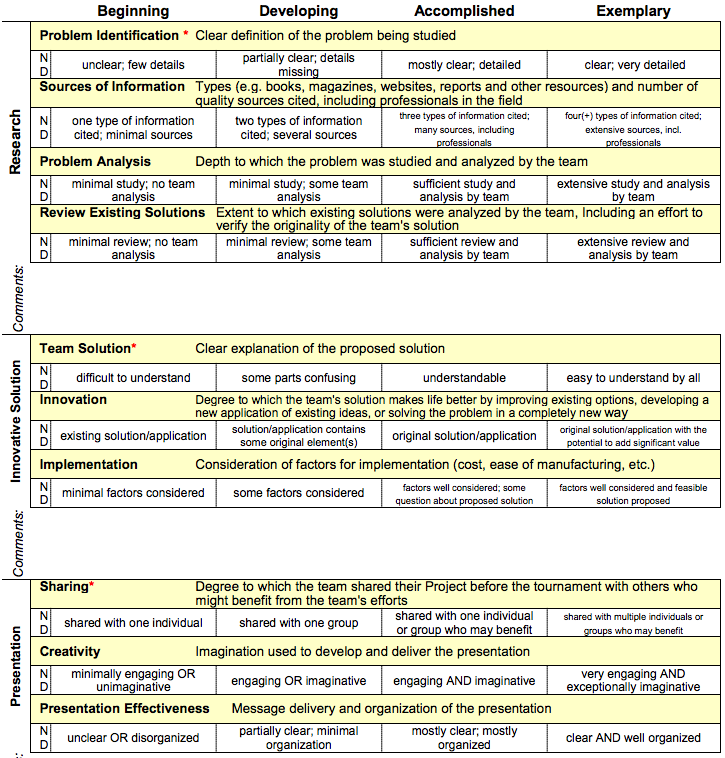
Project Rubric

CEESA FLL Teams

Here are the two official teams for our FLL teams:

SparkyBots 1

Kyle
Adam K
Alex
Logan
Adam F

SparkyBots2

Dima
Gabor
Enrique
Seb
Patrick

Wednesday, October 12, 2016

Leveling Up

Congrats to all of those who have leveled up.  Continue on your Lego learning quest!


Level 1
Have your 'bot stop in the square. Must start from base. Most of 'bot must be in square.
Completed by: Gray, Blue, Yellow, White and Red


Level 1.5
Have your 'bot move in a figure 8 of about a meter in height. Must end up 5 cm or less from starting point. This can be done on the floor or any open area.

Completed by: Gray, White, Yellow, Blue
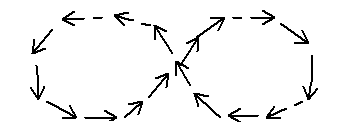
Credit: winningdrills.com

Level 2
Use the touch sensor to touch a wall then have touch sensor trigger 'bot to backup about 30 cm.

Completed:  White

Level 3
Use the light sensor/color sensor to trigger 'bot to stop on line.
Completed: Yellow, Gray


Level 4
Use the light sensor/color sensor so that it goes to the black line in the center of the table and it triggers your 'bot to go back to base.


Level 5
Use the light sensor/color sensor to follow a black line for at least 25cm.

Level 6 
Use the light sensor/color sensor to follow a black line and continue on a 90 degree turn for at least 15 cm.


Level 7
Bring a manure chip from the circle back to base.


Level 8
Use the proximity sensor to stop 5cm from a wall then back up 20 cm and turn around 180 degrees.

Level up: Missions:  Complete any mission successfully.

Bonus: If you teach another group how you completed a level and your students are then able to complete the level, you will get two more level blocks.

More levels to be added.
Leveling Up

Congrats to all of those who have made it to the first level.  We are adding more levels here so you can continue on your Lego learning quest.


Level 1
Have your 'bot stop in the square. Must start from base. Most of 'bot must be in square.
Completed by: Gray, Blue, Yellow, White and Red


Level 1.5
Have your 'bot move in a figure 8 of about a meter in height. Must end up 5 cm or less from starting point. This can be done on the floor or any open area.

Completed by: Gray, White, Yellow, Blue

Credit: winningdrills.com

Level 2
Use the touch sensor to touch a wall then have touch sensor trigger 'bot to backup about 30 cm.

Completed:  White

Level 3
Use the light sensor/color sensor to trigger 'bot to stop on line.
Completed: Yellow, Gray


Level 4
Use the light sensor/color sensor so that it goes to the black line in the center of the table and it triggers your 'bot to go back to base.


Level 5
Use the light sensor/color sensor to follow a black line for at least 25cm.

Level 6 
Use the light sensor/color sensor to follow a black line and continue on a 90 degree turn for at least 15 cm.


Level 7
Bring a manure chip from the circle back to base.


Level 8
Use the proximity sensor to stop 5cm from a wall then back up 20 cm and turn around 180 degrees.

Level up: Missions:  Complete any mission successfully.

Bonus: If you teach another group how you completed a level and your students are then able to complete the level, you will get two more level blocks.

More levels to be added.

Sunday, September 25, 2016

Animal Allies Mission Videos

These videos can help you understand the missions that you will be programing your robot to complete for points during competitions.

Official FLL Video explaining each mission, no mention of point values:


If you are new to Lego Mindstorms check out this first video.  It features an EV3 robot completing some of the missions.  Keep in mind for each mission you must not just complete the mission objective, but also your robot must make it back to base without any help from a human:


Thanks Ms. Mahon for finding this video of kids explaining how they understand the mission to be completed in simple terms:


Each mission with point values explained:


Thursday, September 15, 2016